How to Remove Copyrighted Music from a Video (and Avoid Demonetization)
You filmed in a shop, a gym, a restaurant, a festival, and music was playing. Now YouTube has flagged the video, slapped a Content ID claim on it, and the revenue is going to whoever owns that track. You didn’t choose the song. It was just in the room. But the system doesn’t care, it heard the music and matched it.
Why this happens
Content ID works on audio fingerprints. It listens to your video, compares it against a database of registered tracks, and flags a match. It doesn’t matter that the music is faint, in the background, or incidental to what you were filming. If the fingerprint matches, you get the claim.
So the fix is straightforward in theory: remove the thing it’s matching against. Take the music out and there’s nothing left to fingerprint.
The usual options, and why they hurt
Mute the section. Easiest and worst. You lose your own voice and everything else along with the music. Now there’s a dead patch in your video.
Replace the whole audio track. Works if you were going to dub over it anyway, but useless when you need the dialogue you recorded.
Dispute the claim. Slow, uncertain, and if the music really is in there, you’ll probably lose. You’re arguing against a correct match.
None of these keep what you want, which is your voice, minus the song.
Taking out just the music
This is a separation job. You need to pull the music off the recording and leave the voice.
SoundScrub is a desktop app that does this. You drag the clip onto it, hit Remove, pick “background music”, and it gives you the file back with the music gone and your voice intact. Drop that back into your video in place of the original audio, and the thing Content ID was matching is no longer there.
One honest note: this isn’t a magic shield. If a tiny bit of the track survives in the mix, a strict match can still fire. But removing the music removes what the system listens for, which is a far better position than muting your own audio or hoping a dispute goes your way.
It also works on more than music. Remove a siren, a PA announcement, a song someone was playing on a phone. You name the sound, it takes that out. There’s no subscription, just $0.25 per 30 seconds.
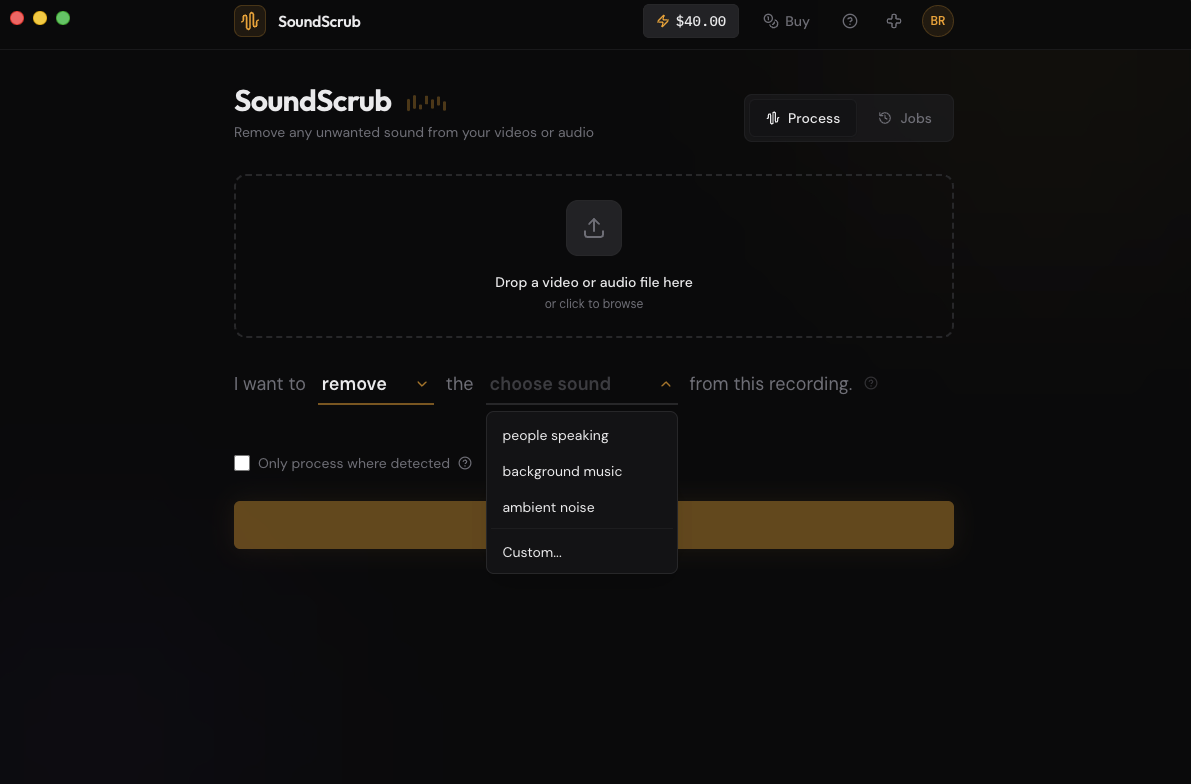
Doing it
Export the flagged section as a video from your editor, or the whole video if it’s short. Drop it into SoundScrub and you get the same video back with the music gone. Reimport it and put it in place of the original. The audio is already swapped in, so there’s no track to mute by hand, and the quality matches what you exported.