How to Make Speech Clearer Over Background Noise Without Removing It
Not every recording needs the background ripped out. Sometimes the ambiance is part of it. A café you want to feel busy, street noise that sets the scene, a room with its own hum. The problem isn’t that the sound is there. It’s that it’s sitting too close to the voice, and the talking gets buried in it.
Killing the background fixes the voice but flattens the scene. You end up with clean speech in a dead, silent room that feels wrong for what you shot. What you want is to turn the ambiance down, not off.
Why the volume fader doesn’t help
The voice and the background are one recording. Pull the fader down and they both drop together, so the voice is still buried under the same amount of noise, just quieter overall. Push it up and you bring the noise right back with it. There’s no fader for “the background only,” because the editor sees a single mixed track.
To turn one down without touching the other, the two have to be separated first, then balanced.
Lowering the background instead of removing it
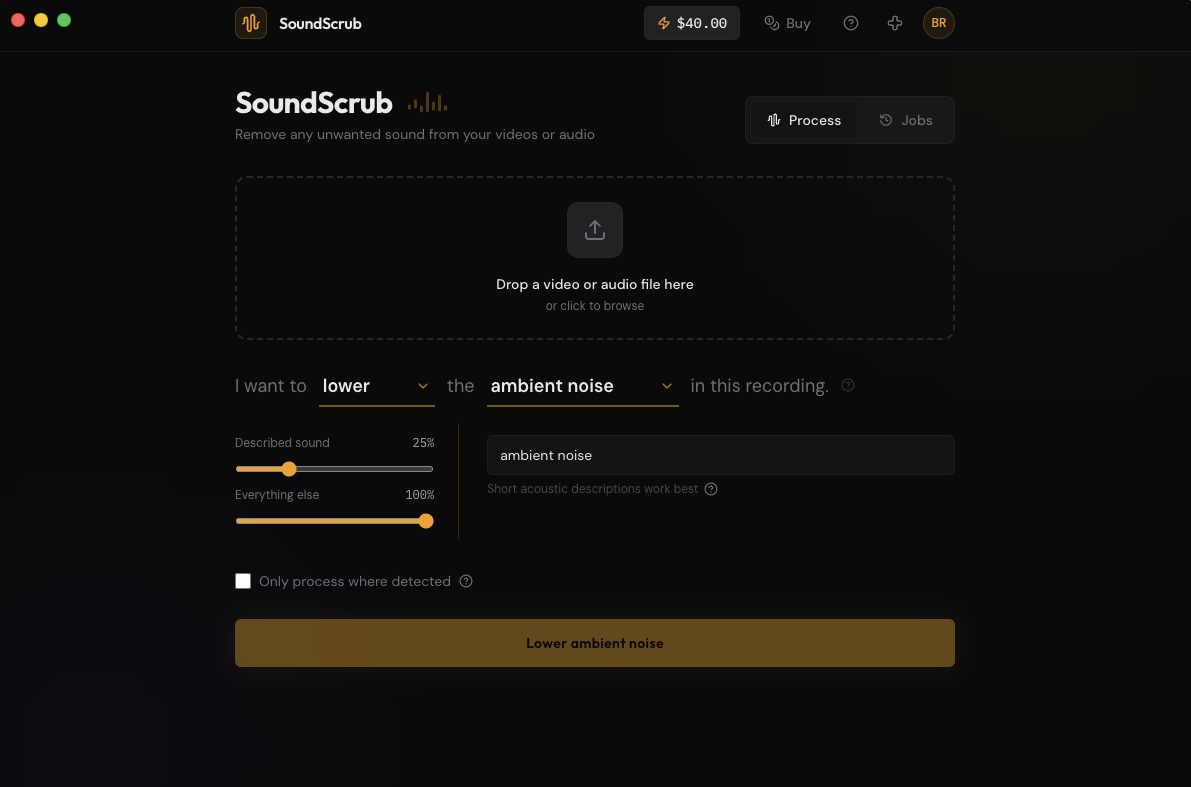
SoundScrub has a mode for exactly this. Instead of Remove or Keep, you pick Lower. It splits the recording into the sound you name and everything else, then lets you set how loud each part comes back.
So you drag the clip in, choose Lower, and name the sound that’s in the way, “background music”, “traffic”, “ambient noise”. Then you set the levels: keep the voice up front and bring the background down to something like a third of where it was. The music, the traffic, the weather is still there, just sitting underneath the voice instead of on top of it. The scene stays alive and the talking is clear.
It’s the same separation that powers Remove, but with a mixing step on the end instead of a hard cut. Same $0.25 per 30 seconds, no subscription.
Fitting it into your edit
Export the clip as a video from your editor. Drop it into SoundScrub, pick Lower, name the background, and dial the levels. You get the same video back with the new mix, so reimport it and drop it in place of the original. The audio is already swapped in, so there’s no track to mute by hand, and the quality matches what you exported.
Looking at voice-cleanup tools too? See SoundScrub vs Adobe Podcast Enhance.